無料活用テクニック:
亨亨猫公式サイト - hhm.show
(亨亨猫のイニシャル + ".show")—— この公式サイトドメインをご確認ください
(亨亨猫のイニシャル + ".show")—— この公式サイトドメインをご確認ください
ようこそ!すべての亨亨猫の新旧ユーザーの皆様の越境ビジネスの大成功を祈っています!!!
無料越境ツールナビゲーション
当サイトの登録ユーザー数は25,800名を突破しました。皆様のこれまでのご支援に感謝いたします!新旧ユーザーの皆様、当サイトで
メンバーシップのご利用(更新)
をお待ちしております。
ご利用上の注意
1.
デジタル商品(バーチャル商品)は、原則としていかなる返金もお受けできません!価格はウェブページに実際に表示されているものに準じます。
技術は継続的に更新・進化しているため、各プラットフォームへの適用性には差異が生じる可能性があります。当サイトの実際の機能に準じてご利用ください!
2.
サテライトサイト(分站)を開設すると収益が得られます!サテライトサイトの代理店はコスト価格が適用されます。
サテライトサイト代理店加盟 をクリックして詳細をご覧ください。
サテライトサイト開設価格は引き下げられました。開設方法についてはカスタマーサービスにお問い合わせください。
(注意:サテライトサイト開設 ≠ メンバーシッププランの購入です。注文ミスによる返金はできませんので、ご注文前に十分ご確認ください。)
3.
当サイトの
PC版ソフトウェア
のご利用を強くお勧めします。
中にある「万能オーディオビデオスニッフィング」機能は非常に強力です。
ウェブ上のほとんどの音楽と動画をダウンロードでき、「再生できるものはダウンロードできる」を実現します。
YouTube、TikTok、Instagram、Facebook、X(Twitter)、小红书、VKontakteなどの主要プラットフォームからニッチなプラットフォームまで、動画、オーディオ、画像ギャラリーなど多様な形式をサポートしています。
動画/画像ダウンローダー
1000以上のウェブサイトから動画、アルバム、音楽をダウンロード
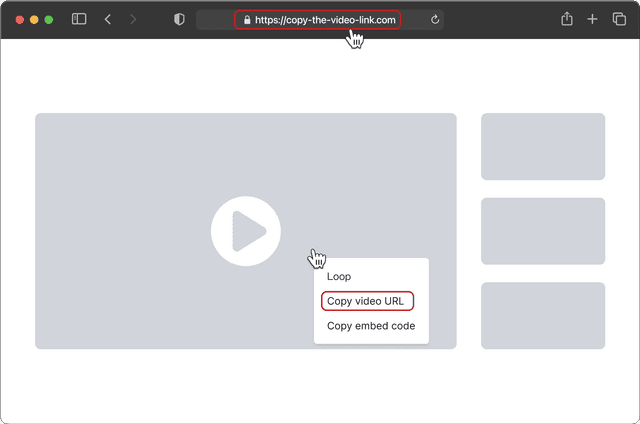
共有をクリックしてリンクをコピーを選択してリンクをコピー
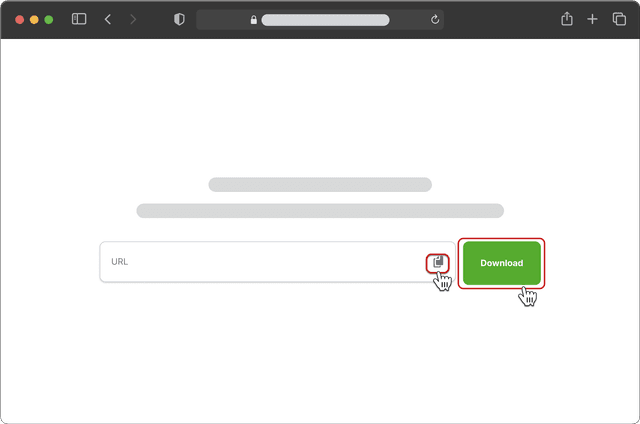
リンクを入力ボックスに貼り付けてダウンロードをクリック
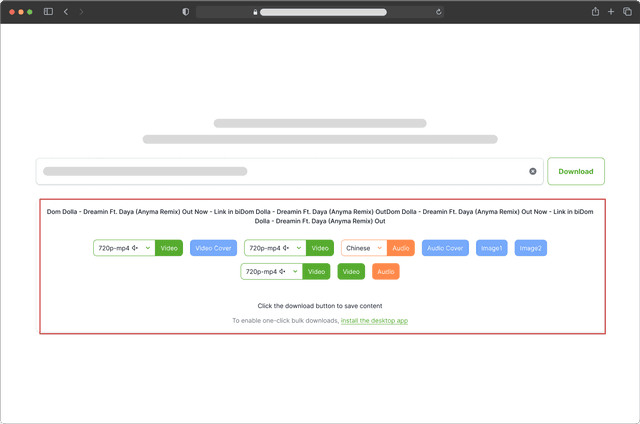
ダウンロードする動画解像度または音声言語を選択
- 共有をクリックしてリンクをコピーを選択してリンクをコピー
- リンクを入力ボックスに貼り付けてダウンロードをクリック
- ダウンロードする動画解像度または音声言語を選択
デスクトップアプリで全機能を体験
一括ダウンロード、ユニバーサルリソース検出、高度な音声・動画一括編集をお楽しみください。
ユニバーサルメディアダウンローダー
内蔵ブラウザを使用して、あらゆるウェブページから音声や動画を簡単に検出・ダウンロード。コンテンツを自動スキャンし、追加手順なしで一括ダウンロードをサポート。
プレイリスト・チャンネル一括ダウンロード
YouTube、Instagram、Twitter、TikTok、Bilibiliなどから、プレイリスト全体、チャンネル、ハッシュタグコレクションをワンクリックでダウンロード。
1000以上のウェブサイトに対応
YouTube、X、Instagram、TikTok、VKontakte、Facebook、Bilibiliなど、1000以上の人気サイトから動画、画像、音声をダウンロード。
超高解像度品質 – 最大8K無劣化
利用可能な最高解像度—8K、4K、または1080Pを自動ダウンロード。プロの編集、映画鑑賞、または品質が重要なあらゆる用途に最適。
動画から音声に変換
URLまたはローカル動画からワンクリックで素早く音声を抽出。編集、メディアライブラリでの再利用、オフライン再生などのためにMP3または他の形式に変換。
マルチリンクダウンロード
最大20の投稿リンクを一度に貼り付け。すべての動画や画像をワンクリックでダウンロード。
よくある質問
入りません。画面録画や再エンコードではなく、配信元のオリジナルファイルをそのまま取得するため、プラットフォームのロゴも当サイトの印も映像に重ねられることはありません。
必要ありません。リンクを貼るだけでブラウザ上で完結します。まとめて処理したい、中断したところから再開したい、ファイル名を自動で整理したい——そういう場合にデスクトップ版を検討すれば十分で、前提条件ではありません。
選べます。解析が終わると、その素材で利用できる画質とフォーマットがすべて一覧に出るので、必要なものを選んでください。サイトによっては最高画質が映像と音声に分かれており、その場合は結合が必要な旨が表示されます。
できます。画像投稿は一枚ずつ原寸で列挙され、投稿に付いている BGM も独立した音声項目として出てくるので、自分で切り出す必要はありません。
できません。ログイン・フォロー・課金・会員資格が必要な投稿は当サイトからも見えないため、そうしたリンクは中途半端なファイルを返さず、その場で失敗として扱われます。
あります。表示されるのは配信元の直リンクで、数十分から数時間程度で期限切れになります。解析後は早めに保存してください。期限が切れたら、もう一度解析すれば新しいリンクが得られます。
できます。複数リンク抽出は貼り付けた一括のアドレスを順番に処理します。プロフィール一括の方は投稿者のページを指定し、公開されている投稿をページ単位でたどっていきます。
多い順に、投稿が削除または非公開になった、リンクが個別の投稿ではなく検索ページやトップページを指している、そのプラットフォームが未対応、地域制限がかかっている——の四つです。同じサイトの別の公開リンクで一度試すと、リンク側の問題かサイト側の問題かを切り分けられます。